
How Digitization Works: Turning Real-World Information Into Digital Data
Digitization is basically how computers take real-world information and turn it into a form they can understand and use. Everything you see on a computer including text, music, videos, and even AI systems depends on this process. At the core of it all is binary code, which uses only 1s and 0s.
Computers use binary because they are built from tiny electronic parts called transistors. A transistor is basically a switch that can be either on or off. Those two states naturally match 1 and 0, which is why digital systems are built this way. When you combine millions or even billions of these switches, you can create logic gates and circuits that do all kinds of computing tasks.
Sources & Prompt
How text is digitized
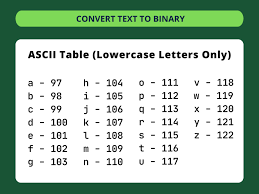
Text is one of the simplest things to digitize. Each letter or symbol is assigned a number using systems like ASCII or Unicode. For example, the letter “A” is stored as the number 65 in ASCII, and then converted into binary (01000001). Unicode is used in modern systems because it supports way more characters, including different languages and emojis. The downside is that it takes more storage compared to older systems like ASCII. Once text is in binary form, computers can store it, send it across the internet, and display it again whenever needed without changing the actual content.
How sound is digitized
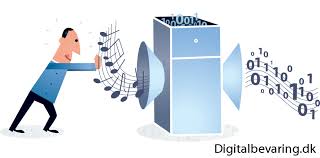
Sound is a little more complicated because it is continuous in real life. It moves in waves, not separate pieces like text. To digitize sound, computers take samples of the wave at regular intervals. This is called sampling. If the sampling rate is too low, the sound becomes distorted, which is why there is a rule (Nyquist theorem) that says you need to sample at least twice the highest frequency to get accurate sound. After sampling, each value is rounded off in a process called quantization. More bit depth means better sound quality but also larger file sizes. Finally, the data is turned into binary and stored in files like MP3 or WAV.
Tradeoffs
Text
- More characters supported (like Unicode) means bigger file sizes
- Simpler systems (like ASCII) are smaller but limited
Sound
- Higher quality audio needs more data
- Smaller files usually lose some detail through compression
- Better quality usually means more storage and processing power
Sources & Prompt
Prompt:
Demonstrate the process of digitization as it applies to text and sound, including the tradeoffs that must be considered in the process.
Sources: